Choose the free WhatsApp Business app if one or two people reply to customers by hand. Choose the WhatsApp Business API (the WhatsApp Business Platform) when you need several staff on one number, automated replies or a chatbot, or WhatsApp connected to your CRM, website or booking system. You don’t always have to choose: Meta now lets many businesses keep using the app on the same number after connecting the API.
WhatsApp is often the first place customers contact a business, so getting this choice right matters. Stay on the app after you’ve outgrown it, and enquiries slip through the cracks. Pick the API too early, and you pay for features you don’t use. Here’s the WhatsApp Business app vs API decision explained in plain terms.
The two options in brief
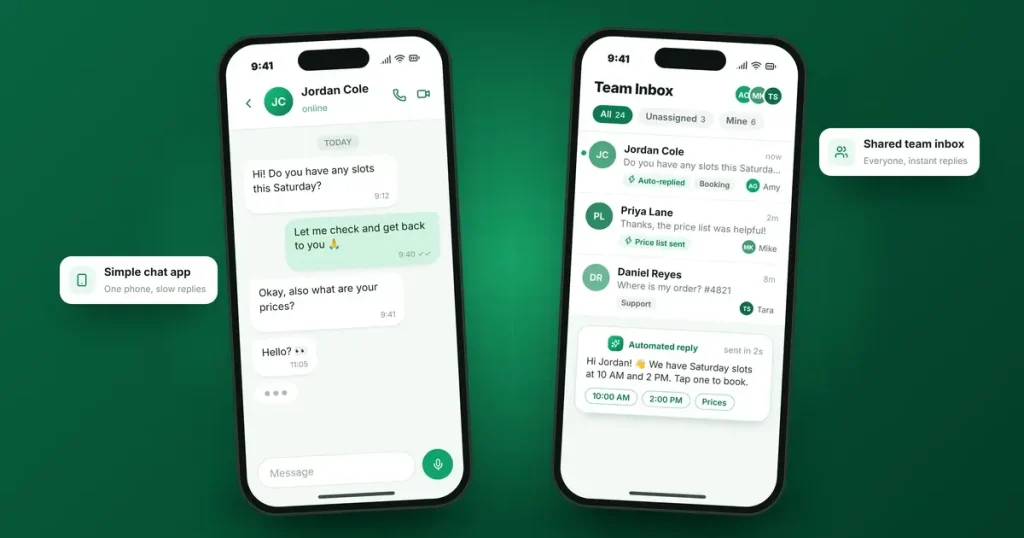
- The WhatsApp Business app is a free app for Android and iPhone. You install it on a business phone number and reply to customers yourself, with tools such as a business profile, product catalogue, labels, greeting and away messages, and saved quick replies.
- The WhatsApp Business API, which Meta calls the WhatsApp Business Platform, has no app of its own. It connects WhatsApp to other software, such as a shared team inbox, a chatbot, your CRM or your booking system. Businesses usually access it through a provider or directly through Meta’s Cloud API.
Side-by-side comparison
|
|
WhatsApp Business app |
WhatsApp Business API |
|---|---|---|
|
Cost |
Free to download and use; some optional paid features |
Meta charges per message after a free monthly allowance for replies, plus any provider fees |
|
Who replies |
You, by hand |
Your team through a shared inbox, a chatbot or an AI agent |
|
Team access |
One phone plus a small number of linked devices |
Many staff on one number, with conversations assigned to the right person |
|
Automation |
Greeting and away messages, saved quick replies |
Full automation: chatbots, routing, follow-ups and integrations |
|
Messaging customers first |
Broadcast lists, which only reach contacts who have saved your number |
Approved template messages to customers who have opted in |
|
Connections |
No direct CRM connection |
Connects to your CRM, website, booking and other systems |
|
Setup |
Minutes |
Days to a few weeks, including Meta business setup and template approval |
|
Best for |
Sole traders and small teams |
Growing teams, higher volumes and automated follow-up |
Our guide to WhatsApp Business API pricing explains how Meta’s per-message charges work since 1 October 2026.
When the app is enough
The app is usually the right choice if:
- One or two people handle customer messages.
- You receive a manageable number of chats each day.
- You’re happy replying by hand, with quick replies for common questions.
- You don’t need WhatsApp conversations to appear in a CRM.
Used well, with a complete profile, a catalogue and clear away messages, the app gives small businesses a professional presence at no cost.
When you need the API
It’s time to consider the API when:
- Several people need to answer on one number, and you need to see who is handling each conversation.
- Messages are being missed at busy times or out of hours.
- You want automation, such as instant answers to common questions, booking links or follow-ups.
- You want WhatsApp in your CRM, so every conversation sits alongside the customer’s history. Our guide on how to choose a CRM can help if you don’t have one yet.
- You need to send updates at scale, such as booking reminders or order notifications, to customers who have opted in.
Can you use both on the same number?
Often, yes. Meta supports what it calls coexistence: a number already used on the WhatsApp Business app can be connected to the Cloud API while you keep using the app on your phone. Messages you send from the app stay free, while messages sent through the API are charged as normal. A few practical points:
- It isn’t available in every country yet, so check with your provider first.
- Linked devices, such as WhatsApp on your computer, may be unlinked during setup and need to be linked again.
- You keep your number and existing conversations, so customers notice nothing.
For many small businesses, this is the gentlest way to start: keep replying from the app as you do now, and add automation and a CRM connection through the API.
What moving to the API involves
- Set up a Meta business account and complete any business verification Meta requests.
- Choose how to connect: through a WhatsApp provider with its own inbox and tools, or directly through Meta’s Cloud API with your own software.
- Decide on your number: use coexistence with your existing app number, or register a separate number for the API.
- Create message templates for the messages you send first, such as reminders and updates, and get them approved by Meta.
- Collect opt-ins. Meta only allows businesses to message people who have agreed to hear from them.
- Connect your systems, such as your CRM, website forms and booking tool.
- Train your team and agree who handles which conversations.
What to budget for
- Meta’s message charges, based on message type and your customers’ country
- Provider fees, usually a monthly subscription for the inbox and tools
- Chatbot or AI costs, if you use them
- Setup and integration, whether you do it yourself or get help
The API costs money where the app is free, but for a busy team it often pays for itself through faster replies and fewer lost enquiries. Our guide to speed to lead explains why reply speed matters so much.
Frequently asked questions
Is the WhatsApp Business API free?
No. Meta charges per message for most messages businesses send through the API, after a free monthly allowance of 1,000 service replies per business phone number. Providers usually charge their own fees on top.
Can I use the WhatsApp Business app and the API on the same number?
In many countries, yes, through Meta’s coexistence option. You can keep using the app on your phone while the API powers automation and integrations. Check availability with your provider.
How many people can use one WhatsApp Business app account?
The app works on one phone with a small number of linked devices, which suits sole traders and small teams. Larger teams usually need the API with a shared inbox.
Do I need a developer to use the WhatsApp Business API?
Not necessarily. Many providers offer ready-made inboxes and chatbot builders. You may need help connecting the API to your CRM or website.
Can I send promotional messages through WhatsApp?
Yes, to customers who have opted in, using approved marketing templates through the API, or broadcast lists in the app, which only reach contacts who have saved your number.
Not sure which is right for you?
We help businesses set up WhatsApp the right way, from a well-configured app to a full API setup with a chatbot and CRM connection. Explore our AI chat agent, workflow automation, lead management and CRM implementation services, or talk to our team.
Sources
- Meta for Developers: Pricing on the WhatsApp Business Platform (message categories, opt-in requirement, free monthly service allowance)
- Meta for Developers: Onboarding WhatsApp Business app users (coexistence)
- 360dialog: WhatsApp Coexistence (app messages stay free, linked devices unlinked during onboarding)
- WhatsApp Business on the App Store (app features: quick replies, away messages, labels, catalogue)