Website maintenance keeps your site secure, working and up to date. It covers software updates, security monitoring, backups, uptime and speed checks, fixes and content changes. Published guides put the website maintenance cost for a small business at roughly $30 to $500 a month, depending on what’s included and how complex the site is. Doing it yourself costs less money but more of your time.
A website isn’t finished at launch. Like a car or a building, it needs regular care to stay safe and keep working. Skip it, and problems build quietly until something breaks: a form stops sending enquiries, the site slows down, or a security hole gets exploited. This guide explains what maintenance involves, how often each task matters, what it typically costs and how to choose the right option.
Why maintenance matters
Most business websites run on software that needs regular updates. WordPress, which powers a large share of the web, is a good example. According to Patchstack’s 2026 report on WordPress security:
- 11,334 new vulnerabilities were found across the WordPress ecosystem in 2025.
- 91% were in plugins and 9% in themes. Only six were found in WordPress itself, all low priority.
- Attackers move fast. Patchstack reported that widely exploited vulnerabilities were typically being attacked within hours of becoming public.
The lesson isn’t that WordPress is unsafe. It’s that the add-ons around it need constant attention. Security is only part of the picture, though. Maintenance also catches broken forms, slow pages, expired domains and outdated content before customers notice them.
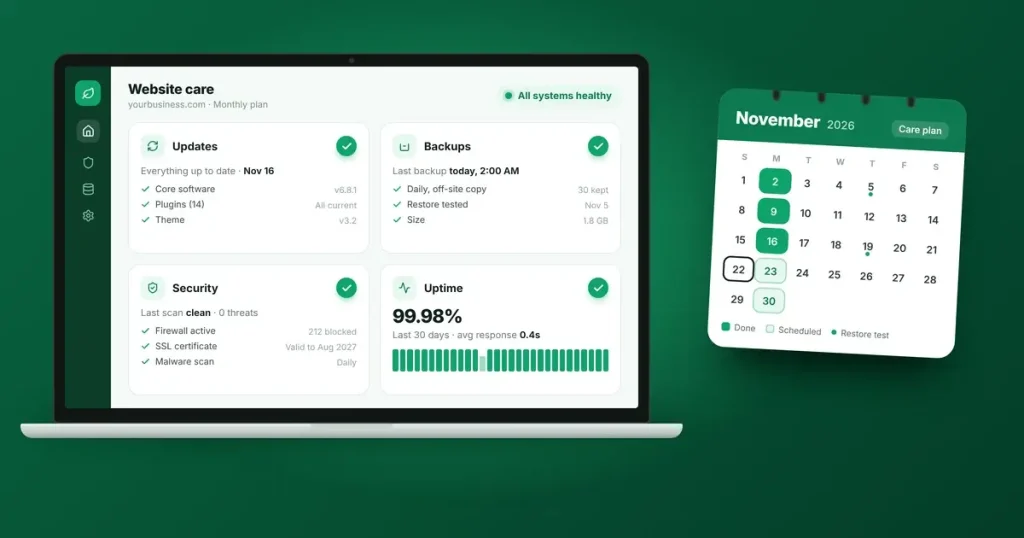
What website maintenance includes
|
Task |
What it involves |
How often |
|---|---|---|
|
Software updates |
Updating the platform, plugins and theme, ideally tested on a copy of the site first |
Weekly, and immediately for urgent security fixes |
|
Security monitoring |
Firewall, malware scanning and login protection |
Continuous |
|
Backups |
Full copies of files and database, stored away from the main server |
Daily, with a test restore every few months |
|
Uptime monitoring |
Alerts if the site goes down |
Continuous |
|
Speed checks |
Testing load times and fixing slowdowns |
Monthly |
|
Form and checkout tests |
Confirming enquiries and payments go through |
Monthly, and after every update |
|
Broken links and errors |
Finding and fixing broken links and missing pages |
Monthly |
|
Domain and security certificate |
Making sure they renew on time |
Checked yearly |
|
Content updates |
Changing text, prices, team details and photos |
As needed |
|
Search and analytics review |
Checking Search Console for errors and Analytics for trends |
Monthly |
What website maintenance costs
As with website build costs, published guides disagree, because they price different things:
|
Guide |
Small business maintenance |
|---|---|
|
WebFX |
$35 to $100 a month for a small business website; $125 to $500 for a larger SMB site |
|
WebsiteSetup |
$30 to $250 a month; basic plans covering updates, security and backups from about $50 to $150 |
|
GoDaddy |
$50 to $500 a month for small to medium business sites |
The spread comes from a few things:
- What’s included. A plan that only runs updates and backups costs far less than one that includes content changes, speed work and reporting.
- How complex the site is. Online shops, booking systems and member areas need more testing and support.
- Who does the work. Your own time, a freelancer paid by the hour, or a care plan from an agency.
- Where they’re based. Rates differ between countries.
Remember that hosting, your domain name and software licences are usually separate costs. Our guide to business website cost shows how to add them into a three-year total.
Doing it yourself, a freelancer or a care plan
|
Option |
Best for |
Watch out for |
|---|---|---|
|
Do it yourself |
Simple sites, owners comfortable with the technology |
Your time, and updates that break something with no backup to roll back to |
|
Freelancer, paid as needed |
Occasional changes on a simple site |
Slow response when something urgent happens, and no routine checks |
|
Care plan |
Businesses that rely on their website for enquiries or sales |
Paying for tasks you don’t need, so check what’s included |
What to look for in a care plan
- How often updates run, and whether they’re tested before going live
- Where backups are stored, how long they’re kept, and how quickly the site can be restored
- How security is monitored, and what happens if the site is hacked
- Response times for urgent problems
- How many hours of content changes are included each month
- A regular report on what was done
- Confirmation that you own your domain, hosting account and licences
- Clear cancellation terms
Signs your website isn’t being maintained
- Your dashboard shows updates waiting for weeks
- Pages feel slower than they used to
- Enquiries have dropped and nobody has tested the contact form
- Visitors see security warnings in their browser
- The copyright year in the footer is out of date
- Links lead to error pages
If your site has several of these problems and is also several years old, a rebuild may be better value than fixing it piece by piece. Our website redesign checklist explains how to replace a site without losing your search traffic.
Frequently asked questions
How much should a small business pay for website maintenance?
Published guides suggest roughly $30 to $500 a month, depending on what’s included. Compare plans by the tasks and response times they cover, not just the price.
Do I need maintenance if my website rarely changes?
Yes. Even if your content stays the same, the software behind your site still needs security updates, and backups and monitoring protect you if something goes wrong.
How often should a WordPress website be updated?
Check for updates at least weekly, and apply urgent security fixes as soon as possible. Test updates on a copy of the site first where you can, and always keep a recent backup.
Does my hosting include maintenance?
Sometimes, partly. Managed hosting often includes backups, security and platform updates, but rarely covers plugin testing, content changes or form checks. Ask exactly what’s covered.
What happens if I skip maintenance?
Risks build over time: security holes stay open, features break after browser or plugin changes, and the site slows down. Fixing a hacked or broken site usually costs far more than maintaining it.
Keep your website in good shape
Our Website Care Service covers updates, security monitoring, backups, performance checks and technical support, and our managed hosting keeps the server side looked after too. Talk to our team about the right level of care for your website.
Sources
- Patchstack: State of WordPress Security in 2026 (11,334 new vulnerabilities in 2025; 91% in plugins, 9% in themes, six in core)
- WebFX: Website maintenance pricing
- WebsiteSetup: Website maintenance costs
- GoDaddy: How much does it cost to maintain a website in 2026?