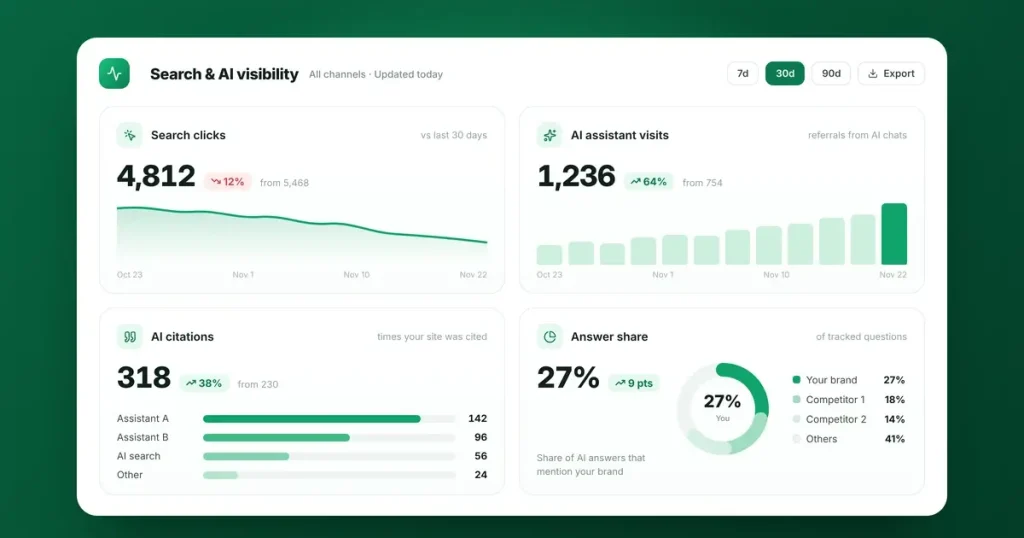
No single tool can measure AI search visibility on its own, so combine four free sources. Use Google Search Console for Google search, including its AI features. Use Google Analytics for visits from AI assistants such as ChatGPT and Perplexity. Use Bing Webmaster Tools’ AI Performance report for citations in Microsoft Copilot. Finally, test a fixed set of customer questions in the main AI assistants each month. Track the trends rather than any single number.
As more people ask AI assistants for recommendations, businesses want to know whether they’re part of those answers. The difficulty is that AI visibility doesn’t fit neatly into the reports most of us are used to. Some of it shows up as traffic, some as citations, and some only as a mention that never produces a click. This guide shows how to measure each part using free tools, and how to bring it together in one simple monthly scorecard.
What “AI visibility” actually means
It helps to separate three things:
- Citations: your page is shown as a source or link in an AI answer.
- Mentions: your business is named or recommended, with or without a link.
- Visits: people click through from an AI answer to your website.
Each one is measured differently, and none of the available tools covers all three.
1. Google Search Console: Google search, including AI features
Google says that traffic from its AI features, AI Overviews and AI Mode, is counted within the normal web search data in Search Console. It isn’t shown separately, so you can’t filter it out. What you can do is watch the patterns:
- Compare clicks and impressions with the same period last year.
- Look for queries where impressions hold steady but clicks fall, which often points to AI answers appearing above your listing.
- Check which pages are gaining or losing clicks.
We explain how to read these patterns in our review of the 2026 research on AI Overviews and click-through rates.
2. Google Analytics: visits from AI assistants
When someone clicks a link in an AI assistant, the visit often reaches Google Analytics with the assistant’s website as its source. Google Analytics has also added a default channel for AI assistants, though some sources can still appear under Referral.
To see your AI traffic:
- Go to Reports › Acquisition › Traffic acquisition.
- Change the main dimension to Session source / medium.
- Filter with a regular expression that matches the main assistants:
chatgpt\.com|perplexity\.ai|gemini\.google\.com|copilot\.microsoft\.com|claude\.ai - Add your key events, such as enquiry form submissions, to see whether AI visitors become customers.
- For a permanent view, create a custom channel group called “AI assistants” under Admin › Data display › Channel groups, using the same rule, and place it above Referral.
Treat the result as a minimum, not a total. Visits from mobile apps often arrive without any source information and appear as Direct. In October 2026, ChatGPT also changed how it opens many links, and Search Engine Journal reported that sites tracked by one analytics firm saw ChatGPT-attributed sessions fall by 22% to 57%, which appears to reflect a change in tracking rather than fewer real visits.
3. Bing Webmaster Tools: citations in Microsoft Copilot
In February 2026, Microsoft launched an AI Performance report in Bing Webmaster Tools. It’s currently the only first-party report from a major platform that shows how often your content is cited in AI answers. It covers Microsoft Copilot, AI summaries in Bing and some partner integrations, and shows:
- Total citations: how often your pages were used as sources
- Cited pages: which of your pages were cited
- Grounding queries: the searches the AI ran behind the scenes when it cited you
In June 2026 Microsoft added views by intent and topic, citation share and comparisons over time. The report doesn’t show clicks, and it doesn’t cover ChatGPT or Google, but it’s free and quick to set up: you can import your site from Google Search Console in a few clicks.
4. Your own question panel: mentions and accuracy
None of the tools above tells you what AI assistants actually say about your business. For that, build a short panel of questions and test it each month.
- Choose 15 to 25 questions your customers would ask, covering your brand, your category and city, comparisons and problems you solve.
- Run them in the same assistants every time, such as ChatGPT, Gemini, Perplexity, Copilot, Claude and Google AI Mode.
- Use a fresh chat and a private window, so earlier conversations and your own history don’t bias the answers.
- Record four things for each answer: whether you were mentioned, whether you were linked, whether the details were accurate, and which other businesses or sources appeared.
- Calculate your share of answers: the percentage of questions where you were mentioned.
One more simple source: add “AI assistant (such as ChatGPT)” as an option to the “How did you hear about us?” question on your contact form. It captures visits that analytics tools miss.
What about paid tools?
Several SEO platforms now track brand mentions in AI answers automatically, by running large sets of questions across assistants every day. They’re useful if you need to monitor many topics or competitors. Before you buy, check which assistants and countries they cover, how many questions they run, and whether you can choose your own.
A simple monthly scorecard
|
Measure |
Where to find it |
What to look for |
|---|---|---|
|
Google clicks and impressions |
Search Console |
Trend against last year; queries where clicks fall while impressions hold |
|
Visits and enquiries from AI assistants |
Google Analytics |
Steady growth, and which pages AI visitors land on |
|
Citations in Copilot and Bing |
Bing Webmaster Tools |
Total citations, cited pages and grounding queries |
|
Share of answers |
Your question panel |
The percentage of questions where you’re mentioned |
|
Accuracy problems |
Your question panel |
Any wrong details to correct at the source |
|
“Heard about us from AI” |
Your contact form |
How many enquiries mention an AI assistant |
Review it monthly and compare quarter by quarter. Single months move around too much to read on their own.
The limits to keep in mind
- The data is incomplete. Each tool shows part of the picture, and AI traffic is undercounted.
- Answers vary. AI assistants can give different answers to the same question depending on the person, location and timing.
- Visibility isn’t the end goal. Enquiries and sales are. Use AI visibility measures to understand why those numbers move.
Frequently asked questions
Can I see AI Overviews traffic in Search Console?
Not separately. Google counts traffic from AI Overviews and AI Mode within your normal web search data, so look for patterns such as steady impressions with falling clicks.
Why does some ChatGPT traffic show as Direct?
Visits from the ChatGPT app, and some links ChatGPT opens without passing on source information, arrive with no referrer, so Google Analytics records them as Direct. That’s why AI traffic figures should be treated as a minimum.
What's a good share of AI answers?
There’s no universal benchmark, because it depends on your market and the questions you choose. Focus on whether your share grows over time and whether the details about you are accurate.
How often should I measure AI visibility?
Monthly is enough for most businesses, with a quarterly review of the trends. AI answers change often, so single results can mislead.
Do I need a paid tool?
Not to start. Search Console, Google Analytics, Bing Webmaster Tools and a monthly question panel cover the essentials for free. Paid tools help when you need to track many questions or competitors.
Want help measuring and improving AI visibility?
We set up AI visibility tracking and then improve it through our AI search optimisation work, including ChatGPT, Microsoft Copilot and Google AI Overviews. If you’re new to the topic, start with our guide to AEO vs SEO vs GEO. When you’re ready, talk to our team.
Sources
- Google Search Central: AI features and your website (AI Overviews and AI Mode counted within web search data in Search Console)
- Bing Webmaster Blog: Introducing AI Performance in Bing Webmaster Tools (February 2026)
- Bing Search Blog: New AI Visibility Insights in Bing Webmaster Tools (June 2026: intents, topics, citation share, compare)
- Search Engine Journal: ChatGPT Traffic Drop Appears To Be A Tracking Problem (October 2026)
- Seer Interactive: Are AI sites like ChatGPT sending your website traffic? (how AI referrals appear in GA4)